Grammarly is a handy tool for correcting translations or grammar. You can pick up Grammarly free vs premium and use them as needed.
To use the free version, you can link your e-mail to Grammarly or choose an email + password to register. You can also buy a premium version that is much different, worthwhile and more accurate than the free version.
If you are considering using this tool, this article fits you. You can learn how to use both the free and premium versions of Grammarly and make the translations as accurate as possible.
How to Use Grammarly?
Using Grammarly is easy. You can access free-Grammarly by simply making an account via the website with e-mail and setting a password to log in. The same goes for the premium version, but you need access to features that are not available in the free version.
Nevertheless, the use of these two versions is the same. You just write sentences on the available Grammarly worksheets. Also, copy your works (paragraphs), paste them into the worksheet, and then correct them with this tool.
Grammarly Free vs Premium
There are striking differences in the features available from each version. However, the premium version is more complete and more accurate in grammatical corrections.
Several features show the main differences between the two versions, such as goals & domains, suggestions for improving words and sentences, available correction, and plagiarism features.
Setting Goals and Domain
Goals and Domains are Grammarly features that are very useful for organising the types of articles for which you will check the grammar. In this feature, you can determine the audience and the formality of the article.
Furthermore, you can set up goals based on academic, business, general etc.) and your intention (to inform, explain, convince or tell something).
However, for the Grammarly free version, you can only make settings on the audience, formality, and intent segments, whereas the domain option, is not available in this free version.
It’s different if you are a Grammarly premium user. You can classify the type of article based on domain, such as academic, business, general, e-mail, casual and creative writing. This domain element distinguishes the free and premium versions of Grammarly. See the difference in the image below:
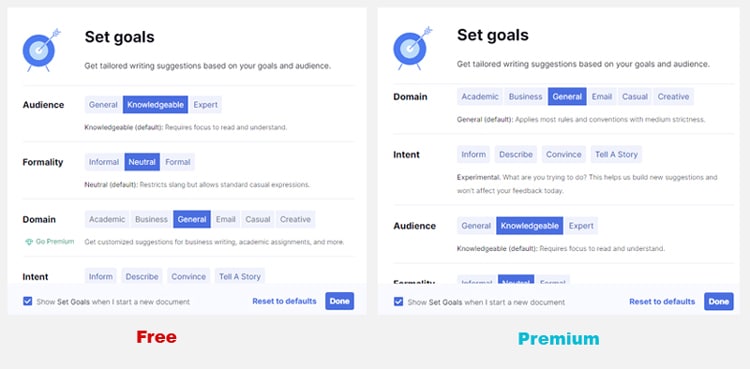
Choosing the domain on Grammarly is highly important because it can change corrections to your writing or articles. It means that whatever domain you select changes all the choices of words, sentence forms, grammar, and other aspects.
Also Read: Explaining Level of Education in Indonesia
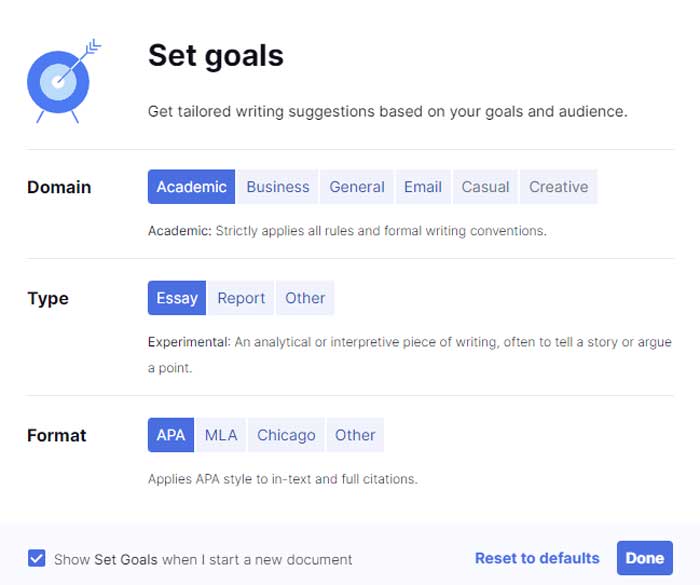
For example, if the article you are checking is an international journal article, then you can set the domain to Academic. In the available options, you can choose whether the type of article is an essay, report, etc. Moreover, you can set writing formats using APA, MLA, Chicago or other formats.
All-suggestion feature: Grammarly Free vs Premium
All suggestions feature is one of the most important features and is the core of checking grammar, spelling, language structure and error correction of articles.
There are four suggestions on Grammarly: correction, clarity, engagement, and delivery. In addition, the latest addition is the style guide. You can find this feature at the bottom right of the Grammarly worksheet.
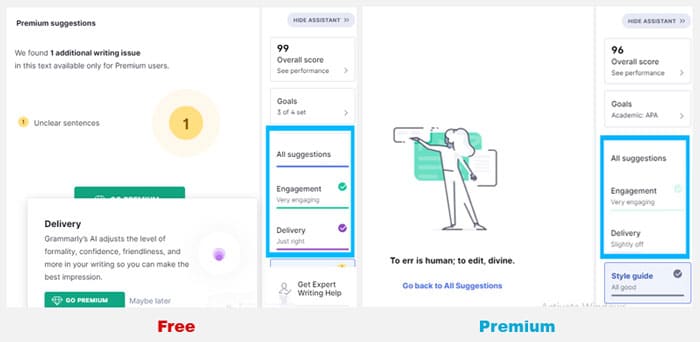
Only correction suggestion is available in the free version, so the free version can only help you correct grammatical errors. On the contrary, all suggestions are available in the premium version, which can be very helpful in checking your paper.
Suggestion: Manual vs Automatic
You can see the Grammarly suggestion function obviously on the worksheet. For Grammarly free and premium, you can click on a specific word to change the word (synonym or equivalent words).
However, if there are other suggestions for improvement (for example, sentences that are not clear), you have to do it manually until no warning appears (yellow). For more details, you may look at the picture below.
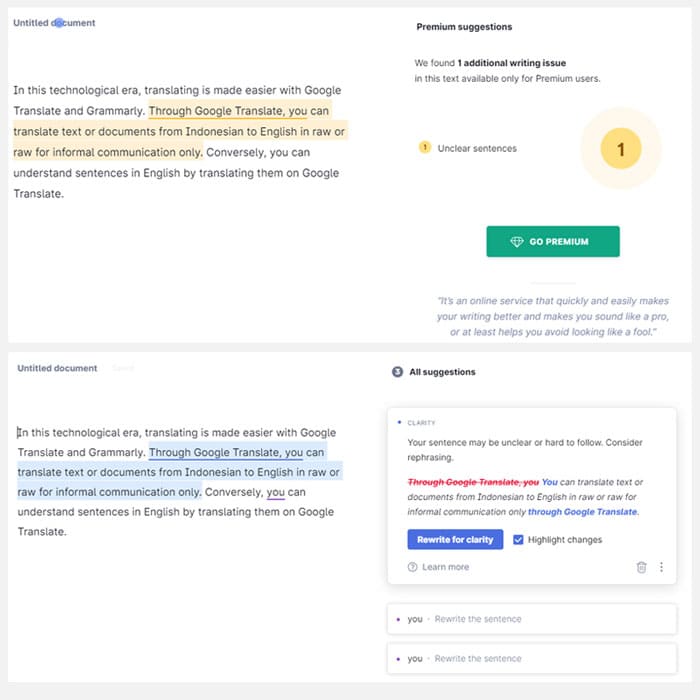
Meanwhile, premium users are more easily provided with existing suggestions and can automatically choose the structure of sentences (for example, clarity). This makes it easier for the users since they don’t have to be bothered to check the errors one by one, which takes a lot of time.
Also Read: How To Say Religious Greetings in Indonesia
Moreover, all suggestions will keep correcting the article until the performance score reaches 100 per cent.
Plagiarism Checker
Plagiarism checking is a must, especially for academic journal articles or online articles, so they are not identified as plagiarism by search engines or other tools.
The Grammarly free version doesn’t have this feature. It can only be accessed by Grammarly premium, which has a fairly high accuracy.
How to use it? You may click on the plagiarism section at the bottom right of your desktop, and then Grammarly will automatically check the plagiarism percentage.
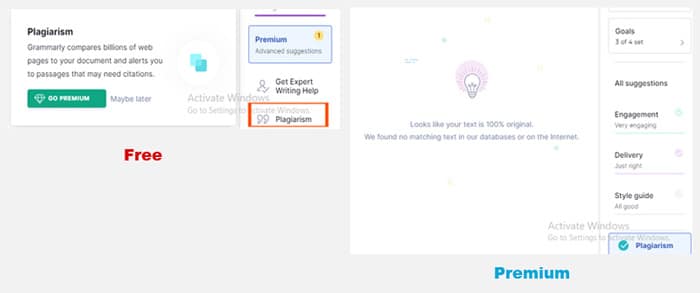
But you must ensure beforehand that you have pasted or uploaded all parts of the writing on the worksheet. If some sentences or paragraphs have plagiarism, you can re-edit them on the Grammarly worksheet and recheck the level of plagiarism.
Grammarly Free vs Premium, Which One to Choose for Translation?
More accurate results can be acquired using Grammarly premium, especially if your articles are academic. In addition, for those of you who have poor English proficiency, it is recommended to use the premium version.
Of course, you can buy the premium version officially on Grammarly. The main disadvantage of using Grammarly Free is that the features are available only for grammar and word changes. However, those with good English skills and enough time to inspect the article until it reaches a score of 100 can use this free version better and more accurately.
However, it should be noted that everyone has their own writing style, so you should carefully inspect the choice of words and the suggested corrections by Grammarly, so your article adapts to your taste and writing style.